

Android phones have many settings that vary by version and brand. It will take time to review all the settings, but there are some that can be useful if configured ahead of time for battery saving.
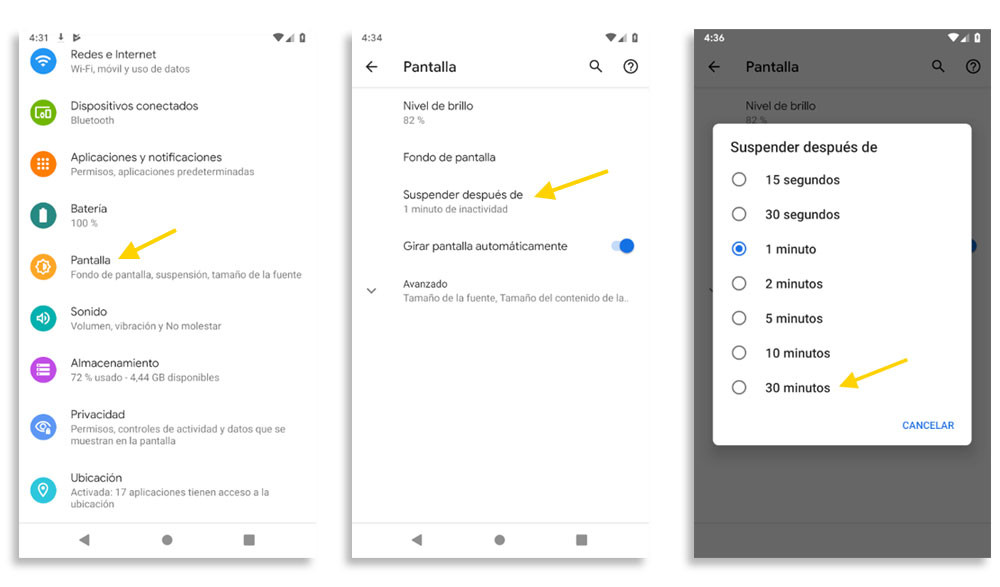
The cell phone screen turns off automatically after a while, usually 2 minutes. The less the screen is on, the less battery the phone will use.
Of course, there are users who need the screen on because they are working on viewing something important on their smartphone or because they are watching a video. Depending on the use, it can be adjusted to the individual's need.
This can be changed from Settings > Display > Screen Timeout.
Some cell phones are too restrictive with apps, closing them with the slightest excuse to extend battery life. Although it is an effective way to extend battery life.
This function is largely dependent on the operator, so it will sometimes be seen as an additional permission for applications, in the Battery menu.
When enabled, it usually works the same way: all applications are displayed and battery optimization can be disabled for important ones, so make sure they don't close while running in the background.
Activar el modo Always On Display
Always On Display is a system in which the smartphone screen is always on and displays basic information such as time, date and notifications. When the phone goes into “sleep” mode, instead of turning off the screen, it turns into a kind of watch.
Always On Display takes advantage of an OLED display function that reduces power consumption while keeping the screen on. It's the same principle that saves battery in dark mode on iPhones: black pixels are completely turned off.
To enable Always On mode on Android, you need to perform the following steps:
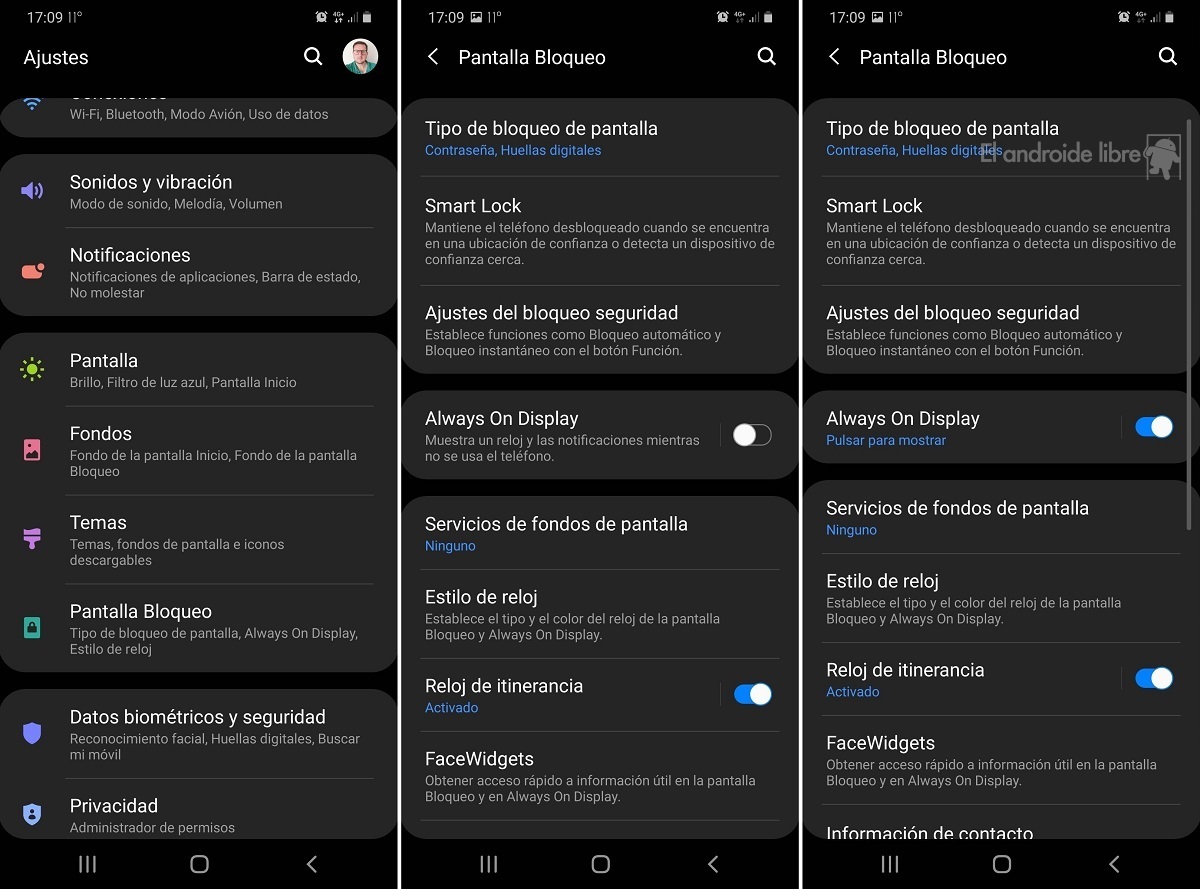
1. The process for enabling Always On Display (AOD) Mode varies by manufacturer and device. On basic Android on Pixel and other phones, it is located in the settings section of the lock screen, although on other mobiles you may need to search a little more.
2. All you have to do is search for and activate the 'Screen On' option. This option may have different names depending on the manufacturer. Sometimes it may appear with the names 'always-on screen', 'Always On', 'Always On Mode', or as in the Google Pixel, 'Always show information and time'. Here you have to find the mode and enable it.
3. The fastest thing is to use the Android configuration finder, which is located at the top. In that search engine, you have to type phrases such as always on, always or screen, then search the results for any reference to something like always on.
The fact: depending on the mobile device, there are cases in which you can also select other items that you want to display in this always-on screen mode. At Pixels there is not much to choose from, but on mobile phones from other manufacturers you can find a wide range of styles, options and customization possibilities.
KEEP READING
Últimas Noticias
Debanhi Escobar: they secured the motel where she was found lifeless in a cistern
Members of the Specialized Prosecutor's Office in Nuevo León secured the Nueva Castilla Motel as part of the investigations into the case

The oldest person in the world died at the age of 119
Kane Tanaka lived in Japan. She was born six months earlier than George Orwell, the same year that the Wright brothers first flew, and Marie Curie became the first woman to win a Nobel Prize

Macabre find in CDMX: they left a body bagged and tied in a taxi
The body was left in the back seats of the car. It was covered with black bags and tied with industrial tape

The eagles of America will face Manchester City in a duel of legends. Here are the details
The top Mexican football champion will play a match with Pep Guardiola's squad in the Lone Star Cup

Why is it good to bring dogs out to know the world when they are puppies
A so-called protection against the spread of diseases threatens the integral development of dogs


