

Since April 1, the Ministry of Finance began to issue property tax invoices, which are available on the new digital platform: Virtual Office, from there taxpayers must register with an email and a secure password and then carry out the procedure for generating the receipt and payment.
However, because not all citizens do not have the facilities to access the new technological means, the Ministry of Finance will send the physical bill to people in strata 1, 2, rural and, in stratum 3, to owners who are adults over 60 years of age.
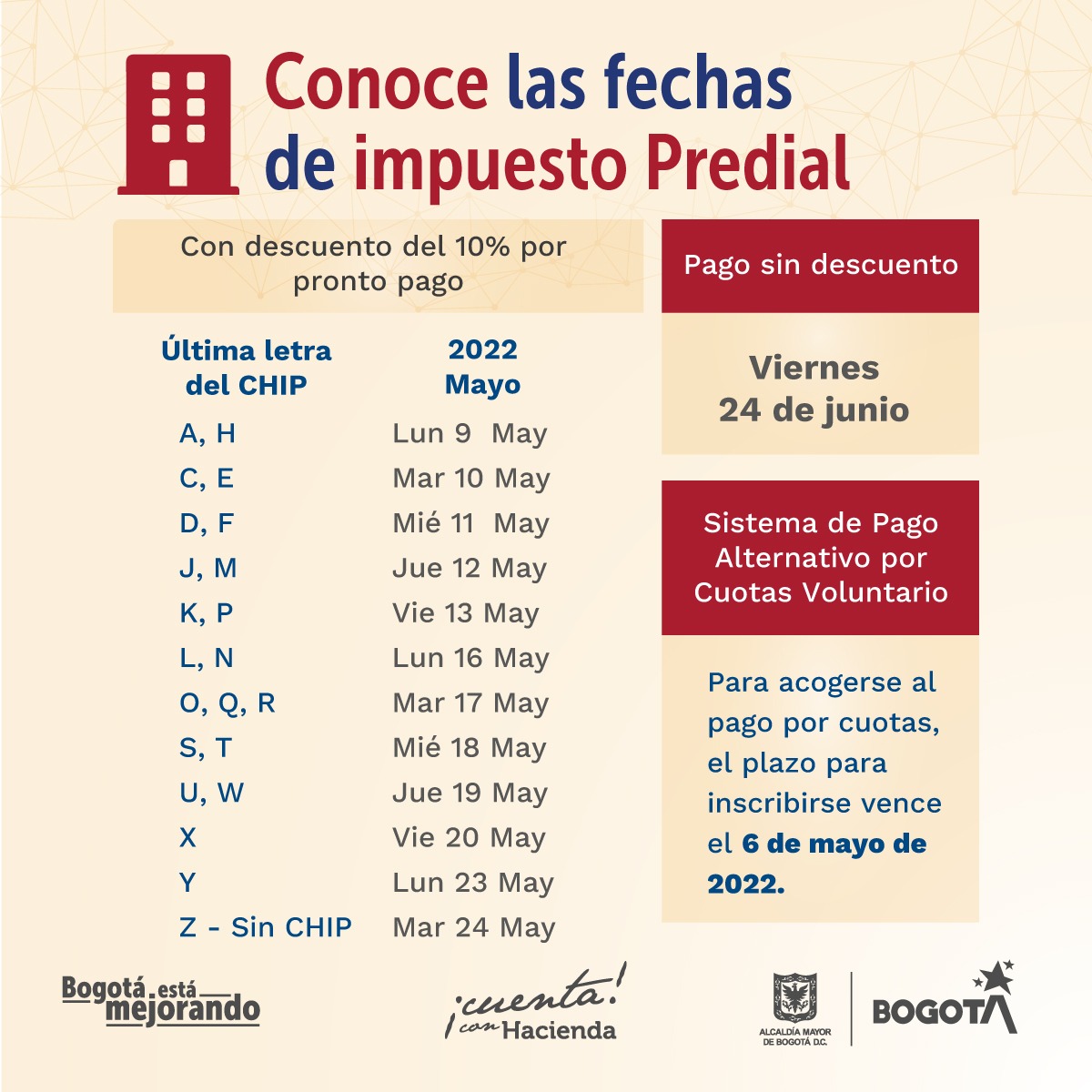
“The expirations of Predial, with a 10% discount, will be staggered from May 9 to 24, according to the last letter of the CHIP; and without a discount, the deadline runs until June 24. That is, taxpayers who have yet to declare and pay the tax will have more than a month to obtain the benefit,” the entity said.
The Mayor's Office will send the physical bills to almost 700,000 properties in strata 1, 2 and rural and to 260,000 stratum 3 homes, whose properties are owned by older adults. These people will be able to comply with the payment of property tax through traditional channels.
For his part, Finance Secretary Juan Mauricio Ramírez explained that the new platform “will simplify procedures and provide complete, accurate and timely information to the more than 2.6 million Predial taxpayers in Bogotá, including those who are going to pay in installments.”
How to register in the Virtual Office?
1. Taxpayers must visit the official website of the District Treasury Secretariat.
2. Go to the Virtual Office section and click on 'Register new virtual office' and then 'Register here'.
3. Select the type of document with which you are going to register and fill in the data requested.
4. Click on the 'OK' option.
5. Answer the validation questions that the system throws up and click 'Submit'. It should be remembered that if the answers are not correct, the system will not allow you to move forward in the process.
6. Create your username and password. If you have previously registered an email on the page, this will appear, but you can modify it if you want.
7. You will receive an email confirming your registration to activate your account.
One of the novelties of this Virtual Office is that the taxpayer's user will no longer be their ID number, but an email, which with a secure password will henceforth allow the procedures to be carried out.
How to download and pay the Property Tax?
After making the respective registration, citizens can go to the page of the Bogotá Treasury Secretariat, to download and pay the respective invoice. Here are the steps to follow:
1. Find the Virtual Office part and select the 'Unified Property Tax' button.
2. Login with the email and password that were previously created.
3. Click on the 'Taxpayer' button to make all transactions and payments.
4. Select the 'Billing' tab.
5. In the drop-down tabs choose the 'Property tax' options, select the year 2022 and click 'Search'.
6. A box will appear where you will find the option to download the invoice and also to make the respective payment.
Property Tax Payment Dates
For this year, taxpayers will have until June 24 to comply with the obligation. However, if the Bogotá is interested in making the payment with the 10% discount, they must cancel it between May 9 and 24.
Keep reading:
Últimas Noticias
Debanhi Escobar: they secured the motel where she was found lifeless in a cistern
Members of the Specialized Prosecutor's Office in Nuevo León secured the Nueva Castilla Motel as part of the investigations into the case

The oldest person in the world died at the age of 119
Kane Tanaka lived in Japan. She was born six months earlier than George Orwell, the same year that the Wright brothers first flew, and Marie Curie became the first woman to win a Nobel Prize

Macabre find in CDMX: they left a body bagged and tied in a taxi
The body was left in the back seats of the car. It was covered with black bags and tied with industrial tape

The eagles of America will face Manchester City in a duel of legends. Here are the details
The top Mexican football champion will play a match with Pep Guardiola's squad in the Lone Star Cup

Why is it good to bring dogs out to know the world when they are puppies
A so-called protection against the spread of diseases threatens the integral development of dogs


